

Legitimate WordPress remote jobs in Bangladesh include content management, website building, theme development, plugin development, WooCommerce support, maintenance, performance optimization, technical support and quality assurance. These roles require different levels of technical skill. Formatting a Gutenberg article is valuable work, but it is not the same as developing a secure custom plugin or debugging production PHP.
This guide explains the main WordPress career paths, skills and tools required for each one, practical portfolio projects, safe client-site workflows, job-search methods, CV and interview preparation, contracts, payments and scams. It is designed for Bangladesh-based beginners, developers, content professionals and freelancers seeking remote employment or international projects.
Quick answer: Can you get a remote WordPress job from Bangladesh?
Yes. Bangladesh-based applicants can pursue remote WordPress jobs when the employer or client accepts their location, skills, schedule and payment method. Beginners may start with Gutenberg content operations, site setup or supervised maintenance. Developers can target custom themes, plugins, integrations, WooCommerce and performance work. A focused portfolio and safe staging workflow are usually more convincing than a long list of plugins.
Use the Remote Jobs in Bangladesh pillar for country-specific application guidance and the Remote Jobs Guide for the complete content hierarchy.
Types of WordPress remote jobs
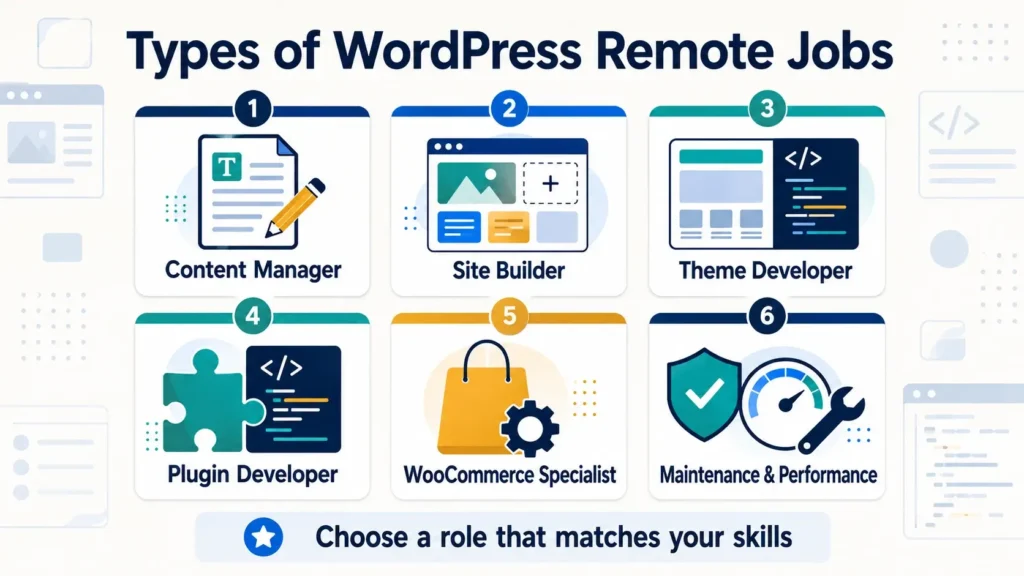
| WordPress role | Typical responsibilities | Core skills | Starting level |
|---|---|---|---|
| Content manager | Gutenberg, images, metadata, links | Editorial QA and basic SEO | Beginner–intermediate |
| Site builder | Configure themes, blocks and pages | Layout, responsive design, hosting basics | Intermediate |
| Theme developer | Create and customize themes | HTML, CSS, JavaScript, PHP, theme APIs | Intermediate–advanced |
| Plugin developer | Build site functionality | PHP, hooks, database, security, testing | Advanced |
| WooCommerce specialist | Store setup, products, checkout, integrations | Commerce workflows and troubleshooting | Intermediate–advanced |
| Maintenance specialist | Backups, updates, monitoring, fixes | Risk control and diagnosis | Intermediate |
| Performance specialist | Measure and improve speed | Web performance and server basics | Advanced |
| WordPress support agent | Troubleshoot user and site issues | Communication and systematic diagnosis | Intermediate |
| QA tester | Test flows, responsive layouts and updates | Test cases and bug reports | Beginner–intermediate |
WordPress content manager
A content manager formats articles in Gutenberg, prepares images, adds approved metadata, checks links, schedules posts and performs editorial quality assurance. Useful skills include heading structure, tables, reusable blocks, image compression, alt text, internal linking and responsive preview. This role may overlap with a content virtual assistant, but it is specifically responsible for publishing quality inside WordPress.
WordPress site builder
A site builder configures an existing theme, block theme or approved page-building system. They assemble layouts, menus, forms, templates and responsive styles without necessarily writing a complete custom theme. Professional work still requires accessibility, performance, content structure and knowledge of which changes belong in a child theme, plugin or site settings.
WordPress theme developer
Theme developers control a site’s presentation using templates, styles, JavaScript, PHP and configuration. The official WordPress Theme Handbook distinguishes block themes—which are mainly built with blocks, HTML templates and theme configuration—from classic themes that rely more heavily on PHP templates. A developer should understand both the client’s current architecture and the modern WordPress editor.
WordPress guidance also separates presentation from site-critical functionality: themes should control design, while behavior that must survive a theme change generally belongs in a plugin. This distinction is important in portfolio projects and interviews.
WordPress plugin developer
Plugin developers add or modify behavior through WordPress APIs, hooks, database operations, REST endpoints and integrations. Secure development requires validating and sanitizing input, escaping output, checking user capabilities, using nonces appropriately and avoiding direct modification of core files. A copied snippet that appears to work is not a safe production plugin.
WooCommerce specialist
A WooCommerce specialist may configure products, variations, shipping, tax settings, checkout, email templates and approved extensions. Development roles can include custom checkout behavior and integrations. Because stores process orders and customer data, changes should be tested with realistic staging data and never experimented with directly during live sales.
WordPress maintenance specialist
Maintenance includes monitored backups, core/theme/plugin updates, broken-link checks, uptime review, security response and controlled troubleshooting. Official WordPress documentation recommends keeping WordPress updated and taking a backup before updates. A professional maintenance process also verifies that the backup can be restored and checks the site after the change.
Performance specialist
Performance work can involve images, caching, fonts, scripts, database queries, hosting and third-party integrations. Measure before changing anything. A faster score achieved by breaking analytics, accessibility or checkout functionality is not a successful optimization.
Skills needed for WordPress remote jobs
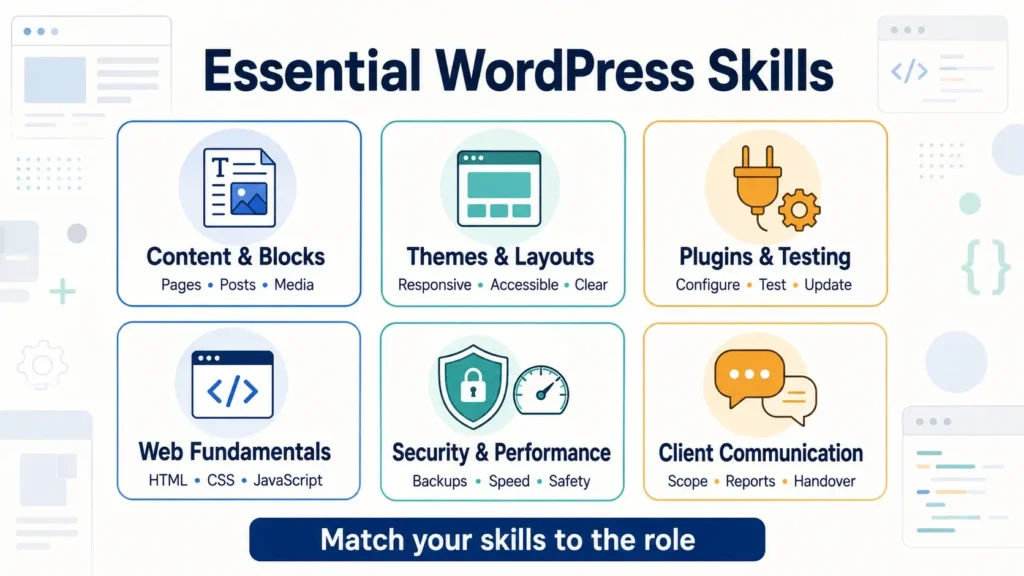
Skills for content and site-operation roles
- Gutenberg blocks, patterns and reusable layouts
- Media library, compression and accessible alt text
- Posts, pages, categories and navigation
- Basic on-page SEO and internal linking
- User roles and permission awareness
- Mobile and cross-browser quality checks
- Safe use of staging, backups and revisions
- Clear editorial documentation
Skills for WordPress developers
- Semantic HTML and modern CSS
- JavaScript and browser debugging
- PHP and WordPress coding standards
- Hooks, filters and template hierarchy
- REST API and data handling
- Git, branching and code review
- Security: validation, sanitization and escaping
- Automated or repeatable testing
- Accessibility and responsive design
- Database and server troubleshooting basics
Do not list every skill on one profile. Match your learning and portfolio to the role. A content manager should demonstrate accurate publishing; a plugin developer should demonstrate maintainable, secure code and tests.
Tools WordPress professionals use
| Tool category | Purpose | What to demonstrate |
|---|---|---|
| Local development | Build safely away from production | Repeatable setup and environment notes |
| Code editor | Edit theme/plugin code | Formatting, search and debugging |
| Version control | Track and review changes | Meaningful commits and branches |
| Browser developer tools | Inspect layout, network and errors | Evidence-based diagnosis |
| Staging | Test updates and features | Production-like verification |
| Backup system | Recover files and database | Restore plan, not only backup creation |
| Performance tools | Measure speed and bottlenecks | Before/after evidence |
| Issue tracker | Manage scope and bugs | Clear acceptance criteria |
A safe WordPress workflow for client sites
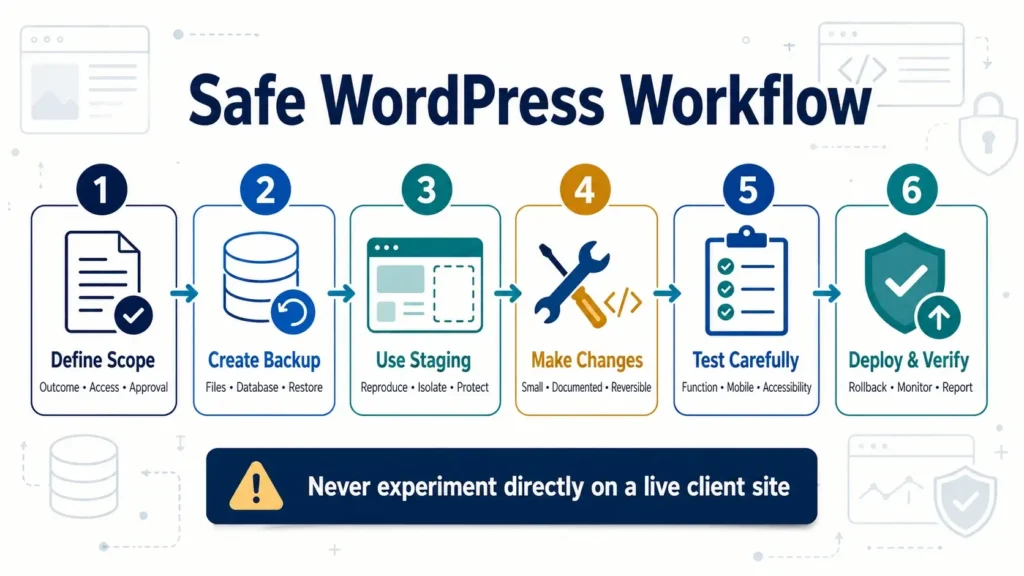
- Clarify the requested outcome and acceptance criteria.
- Record the current site, hosting, theme, plugins and environment.
- Confirm access using the minimum required user role.
- Create and verify a current backup when the change requires it.
- Reproduce the site or issue in staging/local development.
- Make the smallest appropriate change.
- Test functionality, responsive layout and accessibility.
- Review errors, logs and performance where relevant.
- Obtain approval before production deployment.
- Deploy during an agreed window with a rollback plan.
- Test production and document the result.
Never edit WordPress core files. Avoid making a production change without knowing how to restore the previous state. When updating plugins, official documentation advises having a current backup first.
Build a WordPress portfolio without client experience
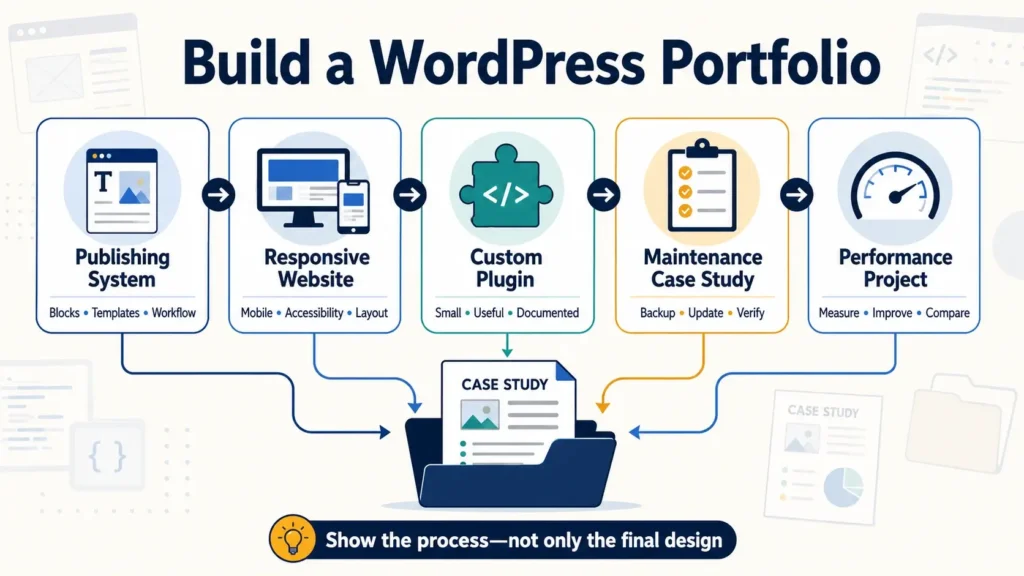
Use a local installation or a low-risk demo environment. Label self-directed projects honestly and avoid showing licensed themes, premium plugins or client data without permission.
Portfolio project 1: Gutenberg publishing system
- Three fully formatted articles
- Consistent heading and table patterns
- Compressed images and useful alt text
- Internal-link map
- Editorial quality checklist
- Mobile preview evidence
Portfolio project 2: Responsive business site
Build a small block-theme or custom-theme site with home, service, about and contact pages. Explain theme choice, template structure, responsive decisions, accessibility checks and performance. Do not rely only on screenshots; provide a working demo or recorded walkthrough.
Portfolio project 3: Small custom plugin
Create one limited, useful feature that belongs in a plugin—for example, a controlled custom content field or administrative workflow. Include secure data handling, user capability checks, documentation and tests. Keep the scope small enough to explain every line.
Portfolio project 4: Maintenance case study
Use a demo site to document backup, staging updates, compatibility checks, broken-link review and rollback. State the initial condition, procedure, evidence and final result. Never intentionally expose a public site to create a security case study.
Portfolio project 5: Performance improvement
Measure a demo site, identify one or two bottlenecks and apply controlled changes. Show comparable before-and-after tests, device/network conditions and functional checks. Do not claim that one laboratory score guarantees real-user performance.
Can beginners get WordPress remote jobs?
Yes, especially in content operations, supervised site building, manual QA and basic support. Beginners should not market themselves as security, server, plugin or WooCommerce experts without the required knowledge. Start with a service you can perform safely and prove.
Use Remote Jobs Without Experience Bangladesh to convert academic and self-directed work into honest evidence. Applicants seeking limited hours can also review Part-Time Remote Jobs in Bangladesh.
How to write a WordPress remote-job CV
Your headline should identify the WordPress path: content manager, site builder, theme developer, plugin developer, WooCommerce specialist or support professional. List projects, responsibilities and outcomes that match that path.
WordPress developer based in Bangladesh with hands-on experience building responsive block themes, developing small custom plugins and maintaining staging-first deployment workflows. Strong in PHP, JavaScript, CSS, Git and WordPress security fundamentals. Built four documented portfolio projects with accessibility and regression checks.
| Weak bullet | Evidence-focused bullet |
|---|---|
| Built WordPress sites | Built a four-page responsive block-theme demo with custom templates, reusable patterns and documented accessibility checks. |
| Improved website speed | Reduced demo-page image transfer by 62% through responsive formats and compression while verifying visual quality. |
| Updated plugins | Tested core and plugin updates on staging, completed a 20-point regression check and documented rollback steps before deployment. |
Use metrics only when the test and baseline are documented. Follow Remote Job CV for Bangladesh for ATS formatting, location wording and project bullets.
Where to find WordPress remote jobs
Search verified company career pages, professional networks, reputable remote job boards, WordPress-focused communities and established freelance marketplaces. Compare the main options in Best Remote Job Websites for Bangladesh.
- WordPress developer remote worldwide
- WordPress content manager remote
- Gutenberg specialist remote contract
- WooCommerce developer remote
- WordPress support engineer remote
- WordPress maintenance remote part time
- block theme developer remote
- junior WordPress developer worldwide
- WordPress QA tester remote
“Remote” may be restricted to one country or time zone. Confirm Bangladesh eligibility, required overlap, contract type, equipment and payment before applying. Use How to Find Remote Jobs in Bangladesh for the complete search workflow.
WordPress job proposal example
Hello [Name], I can help move your approved articles into Gutenberg, optimize images and complete a responsive publishing checklist without changing global site settings. My portfolio includes three formatted articles and a documented editorial workflow. I am based in Bangladesh and available for [hours] per week with [time-zone] overlap. Could you share whether your current workflow uses custom blocks or standard core blocks?
A developer proposal should instead mention the relevant code, architecture, tests and deployment workflow. Do not send the same proposal for content operations and plugin development.
WordPress remote-job interview questions
- What is the difference between a theme and a plugin?
- How do you troubleshoot a problem after an update?
- When would you use staging?
- How do you protect a site before making changes?
- What should never be edited directly?
- How do you test a responsive page?
- How do you handle user roles and permissions?
- How would you diagnose a slow WordPress page?
- How do you report a bug another developer can reproduce?
- What is your plan during an internet or power interruption?
Answer with a specific project and explain the decision, risk and test—not only the tool name. Prepare using Remote Job Interview Tips Bangladesh.
Contracts, scope and payment
Compensation varies by skill, responsibility, client market, contract and urgency. A fixed-price “WordPress website” is not a complete scope. Document the exact pages, functionality, content responsibility, hosting, premium licenses, revisions, testing, deployment and support period.
- Is the engagement employment, hourly contracting or fixed-price?
- Who supplies content, design and licenses?
- Which browsers, devices and flows must be tested?
- Are staging, deployment and post-launch support included?
- How are change requests priced?
- Who owns code, design and documentation?
- Who maintains third-party subscriptions?
- What access will be provided and when removed?
- What is the rate, currency and payment schedule?
- Who pays platform and transfer fees?
Review Freelance Payment Methods Bangladesh and verify current provider rules before agreeing to a method.
WordPress remote-job scams and unsafe work
Fake recruiters may use WordPress, web developer or website assistant titles. The US Federal Trade Commission warns that unexpected remote-job texts can lead to fake checks or task scams and advises people never to pay to get paid or obtain a job.
- You must pay a registration or equipment-release fee.
- The recruiter sends an unexpected WhatsApp or Telegram offer with no job details.
- You receive a check and must buy equipment from a named supplier.
- The client asks for malware, spam, phishing or deceptive pages.
- You are asked to hide code or bypass platform security.
- The “test” is an entire unpaid production website.
- The client refuses written scope, access ownership or payment terms.
- You must share personal banking credentials or an OTP.
- The job requires stolen themes, plugins or license keys.
Verify the company independently and protect both your identity and the site. Use How to Check an Online Job Is Real or Fake in Bangladesh before accepting an unfamiliar offer.
A 30-day WordPress career plan
Choose a WordPress role
- Select content, site building, development, support or maintenance.
- Review 20 genuine job descriptions.
- Record repeated skills, tools and deliverables.
- Set up a safe local or demo environment.
Build your fundamentals
- Learn the relevant editor, APIs or workflows.
- Practise Git, backup and staging concepts.
- Create a role-specific checklist.
- Study official WordPress documentation.
Create evidence
- Complete two focused portfolio projects.
- Document decisions, tests and limitations.
- Create a targeted CV and project page.
- Prepare interview explanations.
Apply and improve
- Apply only to roles matching your evidence.
- Customize the proposal for the site’s problem.
- Verify client, scope and access arrangements.
- Track replies and improve the weakest stage.
Common mistakes to avoid
- Calling site building development: describe your actual contribution accurately.
- Editing production directly: use staging and rollback where risk requires it.
- Modifying core files: updates can overwrite changes and create security problems.
- Updating without backup: recovery is part of maintenance.
- Installing too many plugins: every dependency adds maintenance and compatibility risk.
- Ignoring permissions: request the minimum access needed.
- Using nulled software: it creates legal and security risks.
- Promising perfect security or speed: define measurable work and limitations.
- Accepting vague scope: document features, revisions and post-launch support.
How to grow from beginner to WordPress specialist
A sustainable WordPress career usually develops in layers. First learn how the editor, content model, themes, plugins, users and updates fit together. Next choose a path and deepen the skills that produce a specific business result. A content operator might progress into editorial systems and migrations; a site builder might learn block-theme development; a support agent might move into technical diagnosis; a frontend developer might add PHP and plugin APIs.
- Stage 1—safe operations: create content, manage media, use roles correctly and avoid risky production changes.
- Stage 2—repeatable delivery: document checklists, use staging, test common flows and communicate scope.
- Stage 3—technical specialization: build themes, plugins, integrations, stores, performance systems or advanced support expertise.
- Stage 4—ownership: plan architecture, review code, estimate risk, mentor others and improve delivery processes.
Do not measure progress only by the number of plugins or programming languages you know. Better indicators include fewer preventable errors, clearer estimates, faster diagnosis, safer deployments and more maintainable solutions. Keep a private learning log that records the problem, evidence, decision, test and lesson from each project.
How AI changes WordPress work
AI tools can help draft code, summarize logs, suggest test cases or accelerate repetitive content tasks, but the WordPress professional remains responsible for correctness, licensing, security and client confidentiality. Never paste private credentials, customer data, proprietary code or an unpublished vulnerability into an unapproved service.
Review generated code line by line, confirm that functions and APIs are current, test permissions and failure cases, and document any dependency introduced. AI output that works once on a demo is not automatically production-ready. As routine setup becomes easier to automate, employers are likely to value diagnosis, architecture, accessibility, security, communication and accountable judgment even more.
Frequently asked questions
Can I get a WordPress remote job from Bangladesh?
Yes, when the client accepts Bangladesh-based workers and your skills, schedule, portfolio and payment eligibility match the role. Check every listing’s location restrictions.
Do I need coding for WordPress jobs?
Content management and some site-building roles may require little code. Custom themes, plugins, integrations and advanced troubleshooting require HTML, CSS, JavaScript, PHP and WordPress APIs.
Can beginners work remotely with WordPress?
Yes. Beginners can start with Gutenberg publishing, QA, supervised site setup or basic support after creating relevant samples. They should not accept high-risk security or server work beyond their ability.
Is WordPress site building the same as development?
No. Site building usually configures existing themes, blocks or tools. Development creates or modifies code, architecture and functionality. Some roles include both, but applicants should describe each skill accurately.
How much do WordPress remote jobs pay?
There is no universal amount. Compensation varies by role, technical complexity, experience, client market, contract, urgency and fees. Calculate the effective return from the written scope and offer.
Where should I learn WordPress development?
Start with official WordPress documentation and developer handbooks, then build projects in a local environment. Verify that tutorials match current APIs and secure practices.
Should I update a client’s live site immediately?
Not without assessing risk, backup and testing. Use staging when appropriate, confirm compatibility, obtain approval and keep a rollback plan. Security updates may be urgent but still require a controlled process.
Do I need a WordPress certificate?
Most roles prioritize demonstrated ability over a generic certificate. A focused portfolio, readable code, safe workflow and clear communication usually provide stronger evidence.
Final checklist
- I selected a clear WordPress role.
- I can explain the boundary of my skills.
- I built role-specific portfolio projects.
- I use local/staging environments safely.
- I understand backups, permissions and rollback.
- My CV uses honest technical evidence.
- I check Bangladesh and time-zone eligibility.
- I verify client identity and scope.
- I document licenses, access and ownership.
- I understand the rate and payment method.
- I never pay for the promise of a job.
Final thoughts
WordPress remote work offers several distinct careers, from careful content operations to advanced plugin development. The best path is not to claim every skill; it is to choose a role, build verifiable evidence and protect client sites through controlled access, backups, staging and testing. Bangladesh-based applicants who combine technical competence with dependable communication can compete for legitimate global opportunities.
Return to the Bangladesh Remote Jobs pillar for related job-type and application guides, or use the Remote Jobs hub for the complete structure.
Sources and further reading
- WordPress Theme Developer Handbook
- WordPress Developer Resources: Themes vs plugins
- WordPress Documentation: Updating WordPress and backups
- WordPress Documentation: Managing and updating plugins
- US Federal Trade Commission: Remote job-offer text scams
Editorial note: WordPress versions, APIs, security guidance, job availability and payment methods change. Verify current technical information in official WordPress documentation and current requirements on the employer or provider website.